What is a safe link service?
A safe-link service scans and modifies links in emails, messages, or other digital content. The original web address is replaced with a new address that first routes through a security service. This means that when you click on a link, you are not immediately redirected to the destination page. Instead, the security service first checks whether the destination page could be dangerous. Only then is the webpage opened—or access is blocked.
Such services are frequently used in companies to better protect employees from phishing, malware, and fraudulent websites. Examples include the “Safe Links” feature in Microsoft Defender for Office 365 or Advanced Threat Protection (ATP) for email | Hornetsecurity. They check links in emails and Teams messages before users are redirected to the actual destination page.
Why are links rewritten in the first place?
A Safe Link service modifies links in emails, messages, or other digital content. The original destination address is rewritten to a new address that first routes through a security service. This means that when you click on a link, you are not immediately redirected to the destination page. Instead, the service first checks whether the destination page could be dangerous. Only then is the website opened—or access is blocked. Such services are frequently used in companies to better protect employees from phishing, malware, and fraudulent websites. All of this happens in the background. The check usually takes just a few seconds. During this time, a corresponding notification appears on the screen.
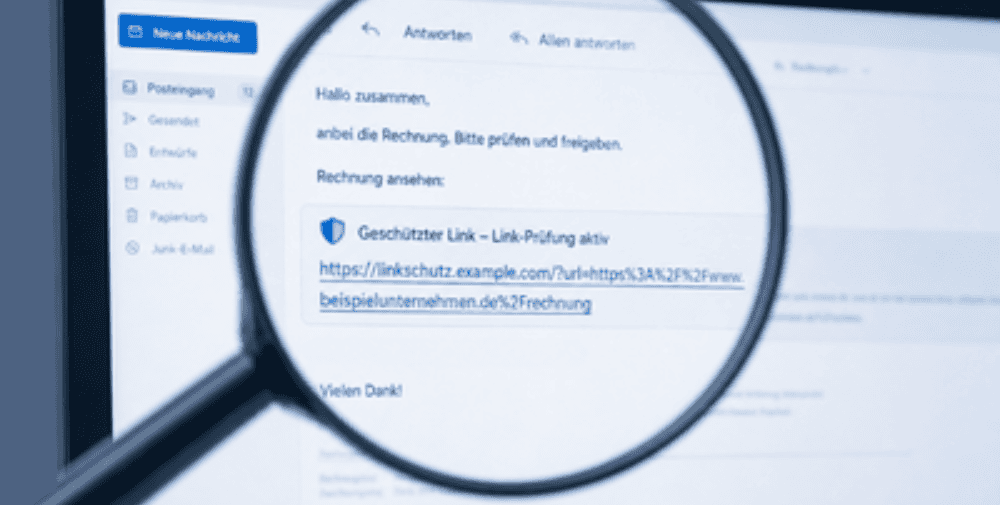
What does a rewritten link look like?
At first glance, a rewritten link may seem unusual or even suspicious. Instead of a short, familiar address like www.beispielunternehmen.de/rechnung, you might see a much longer address that starts with a security service. The original destination address is then contained within this new address or technically embedded in it. This can be confusing. After all, the general rule is that if the visible link doesn’t match the expected address, you should be cautious. With Safe Link services, however, this difference is intentional. The different address does not automatically mean that the link is dangerous. It can also be an indication that the company’s security solution is active. Nevertheless, users should remain vigilant. What matters is not only what a link looks like, but also whether the entire message is plausible.
What happens after you click?
When you click on a rewritten link, a security check runs in the background. Among other things, the service can check:
- Is the destination page known to be dangerous?
- Has the site already been used for phishing?
- Does the link lead to malware?
- Has the destination changed since the message was received?
- Does the address match known attack patterns?
- Are there any indications of fraudulent redirects?
If the link appears harmless, you’ll be redirected to the actual website. If the service detects a risk, access is blocked or a warning page appears. For users, this process usually happens automatically. You do not need to initiate a check manually, nor do you generally need to configure any additional settings.
Why are safe link services important for businesses?
Email and digital communication are among the most common entry points for cyberattacks. Phishing messages often appear deceptively genuine these days. They use well-known brand names, real logos, credible wording, and sometimes even personal information. A safe link service can prevent dangerous links from being opened directly. This reduces the risk of login credentials being stolen, malware being downloaded, or fraudulent websites being accessed. Especially when combined with other protective features, it creates an effective security component. While Safe Links checks for dangerous links, Safe Attachments scans file attachments for suspicious behavior. This safeguards against two common attack vectors: links and attachments.
However, it’s important to remember: Safe-link services do not replace user vigilance. They are a technical protection mechanism, but not a free pass for careless clicking.
What should users still watch out for?
Even with a Safe Link service active, links should be examined critically. You should be especially cautious if a message creates a sense of urgency or urges you to act quickly.
Typical warning signs include:
- The message urgently asks you to enter your login credentials.
- The sender does not match the content of the message.
- The language seems unusual, error-prone, or atypical.
- The link leads to a login page, even though you didn’t request anything there.
- The message refers to an alleged account suspension, payment request, or deadline.
- The message creates fear, a sense of time pressure, or pressure to act.
- The content does not match previous communication channels.
If a link seems suspicious, do not click on it. Instead, open the known website manually in your browser or check with your IT department.
Conclusion
Safe-link services modify links so they can be checked before being opened. They protect companies from many dangerous websites, phishing attempts, and malware. “Time-of-click” protection is particularly important because links can still become dangerous even after a message has been received. To users, rewritten links may look unfamiliar at first. However, they are often a sign that a security solution is working in the background. Nevertheless, a rewritten link is no guarantee of security. The best protection comes from a combination of modern security technology and vigilant behavior. Check links, pay attention to the context of the message, and if in doubt, it’s better to ask for clarification.
– – – – –
Related Links
👉 www.intraconnect.de
Photo: IntraCONNECT